

In this article: Discover how a power headrest recliner changes your eyeline in Zero Gravity so your neck stays relaxed for long movies, gaming sessions, and shared seating.
- Why neck angle is the comfort bottleneck in long sessions
- How a power headrest recliner changes eyeline (and reduces “chin tuck”)
- Zero Gravity seating + headrest: what changes biomechanically
- Dialing in fit for different heights (sharing one chair)
- Buying checklist: what to look for in a power headrest recliner
- Setup tips for movies and gaming ergonomics
- Frequently Asked Questions
A power headrest recliner can make long viewing sessions more comfortable by adjusting your head-and-neck angle to match your screen eyeline—especially in Zero Gravity recline—so you don’t have to “chin tuck” or hold your neck in a strained position. If you watch movies for hours or game for extended sessions, that small change in eyeline often matters as much as seat cushioning.
Quick Takeaways
• Neck fatigue often comes from eyeline mismatch—not just “bad posture.” A power headrest helps align your gaze without forcing your chin forward or down.
• Zero Gravity recline changes where your head naturally wants support; a fixed headrest can miss that new angle.
• Power headrest adjustment helps multiple heights share one chair by fine-tuning head support without changing the entire recline angle.
• Look for independent controls so headrest and recline can be tuned separately (better for both movies and gaming).
• Small tweaks win: a few degrees of headrest tilt can reduce the urge to crane your neck during long sessions.
Why Neck Angle Is the Comfort Bottleneck in Long Sessions
In a media-room setting, discomfort usually shows up first in the neck and upper back. Even in a premium chair, you can still feel fatigue if your viewing angle forces your head to hover in a slightly “held” position. Over time, that sustained effort can feel like tightness at the base of the skull, tension through the upper trapezius area, or a dull ache between the shoulder blades.

The common culprit: “chin tuck” and forward-head compensation
When your screen is a bit too high or your recline is a bit too deep, your body often compensates in one of two ways:
• Chin tuck: your chin subtly drops toward your chest so you can keep your eyes on the screen.
• Forward-head reach: your head drifts forward, away from the headrest, to regain a comfortable eyeline.
Both patterns can feel minor in the first 10 minutes and significant after an hour. The goal isn’t “perfect posture.” It’s effortless posture—where the chair supports your head so your neck doesn’t have to.
Why media-room ergonomics are different than “lounging” ergonomics
In a living room, you might shift positions, look at a phone, or change tasks frequently. In a theater room, your gaze stays fixed forward for long stretches. That steady, forward focus makes eyeline alignment more important—and it’s why a power headrest recliner can be a meaningful upgrade for movies and gaming.
How a Power Headrest Recliner Changes Eyeline (and Reduces “Chin Tuck”)
A power headrest recliner lets you adjust the headrest angle (and in some designs, effective head/neck support position) with a button—so your head can stay supported while your eyes stay level. Instead of changing your whole recline angle to fix the view, you can simply bring the headrest into the right position.

What “better eyeline” feels like
When the headrest is dialed in correctly, you’ll notice:
• Your head naturally “settles” into support (less hovering).
• Your jaw and throat feel relaxed (less chin compression).
• You can keep your eyes on-screen without lifting your shoulders or shifting forward.
Why manual head pillows often fall short
Loose pillows can help, but they tend to slip, compress over time, or push the head forward rather than tilting it into a comfortable angle. A power headrest gives repeatable, fine adjustment—especially valuable if you switch between movie-watching and gaming, where your preferred eyeline can differ.
Quick comparison: fixed vs adjustable head support
| Feature | Fixed/Static Headrest | Power Headrest Recliner |
|---|---|---|
| Eyeline adjustment | Limited; relies on overall recline | Fine-tune head/neck angle independently |
| Long-session comfort | Can be great, but less adaptable | Often better when viewing angle changes with recline |
| Sharing between different heights | May fit one person better than another | Easier to customize per user |
| Best for | One preferred posture | Movies, gaming, and multi-user comfort |
Zero Gravity Seating + Headrest: What Changes Biomechanically
Zero Gravity positioning is designed to distribute body weight more evenly and reduce pressure through the spine by elevating the legs and reclining the back. In practice, many people feel lighter through the lower back and more “cradled” overall.
However, as your torso reclines into Zero Gravity, your head’s relationship to the backrest changes. Your neck may need support at a slightly different angle than it does in an upright posture. That’s where a power headrest recliner becomes especially relevant: it helps the headrest meet you where you are after the recline changes your geometry.
Why Zero Gravity can expose headrest limitations
• Deeper recline shifts the eyeline upward relative to the screen, which can trigger chin tuck if the headrest doesn’t tilt.
• The “sweet spot” is narrow: a small mismatch can cause you to subtly adjust every few minutes.
• Neck support needs vary depending on torso length and how the chair’s backrest pitch fits you.
A simple way to think about it
Zero Gravity can help your lower body and spine feel supported; the power headrest helps your viewing ergonomics keep up. Together, they aim for the same outcome: a posture you can hold without effort.
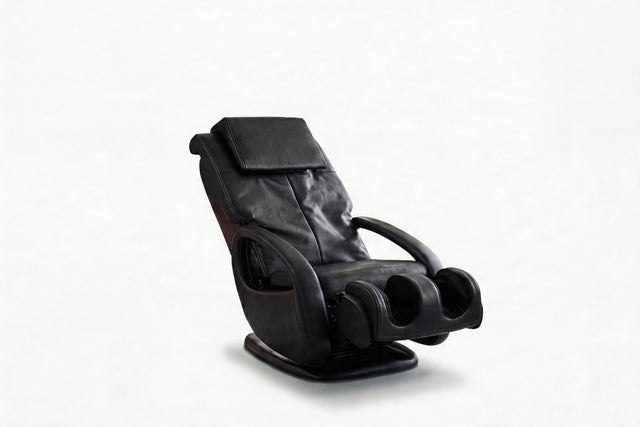
If you’re exploring options designed for long-session comfort, you can browse Valencia’s Wellness Series recliners for models that pair Zero Gravity-style positioning with comfort-focused features.
Dialing In Fit for Different Heights (Sharing One Chair)
One of the most practical benefits of a power headrest recliner is how easily it adapts when two people share the same seat—especially if you’re not the same height. A fixed headrest might land perfectly for one person and feel too low or too far back for another.
What changes between a taller and shorter user
• Where the head contacts the chair: taller users often need support higher up the neck/occipital area; shorter users may need the headrest to tilt sooner to avoid pushing the head forward.
• Eyeline to screen: a few inches of height can change whether you feel like you’re looking “up” or “through” the screen.
• Recline preference: one person may like deeper Zero Gravity recline; another may prefer a slightly more upright gaming posture.
Best practice: treat headrest angle as a personal setting
Instead of forcing both users into the same recline angle, start with a comfortable recline for pressure relief, then use the headrest to refine eyeline. This tends to reduce the “constant micro-adjusting” that leads to neck fatigue.
Buying Checklist: What to Look for in a Power Headrest Recliner
If you’re choosing a chair primarily for movies, sports, or gaming, this checklist keeps the decision focused on long-session neck comfort—not just feature count.
Comfort and ergonomics features that matter most
• Independent headrest control: you should be able to adjust the headrest without changing the recline position.
• Supportive upper back shape: a power headrest works best when the upper back and shoulders are already well-supported.
• Zero Gravity-style recline: look for a recline geometry that reduces pressure and feels balanced, not “dumped back.”
• Quiet, smooth motors: small headrest adjustments are common during long sessions, so smooth movement matters.
• Easy-to-reach controls: you’ll use the headrest more if it’s effortless to adjust mid-movie or mid-game.
Quick self-test when you sit in one
• Recline to your preferred long-session angle.
• Adjust the headrest until your eyes land naturally on the screen—without lifting your chin or pushing your head forward.
• Hold still for 60 seconds. If you feel the urge to “search” for a better position, fine-tune again. The right setup feels settled.
For shoppers focused on comfort features like headrest adjustment and supportive recline geometry, start with the Wellness Series and compare models based on how easily you can personalize head-and-neck support.
Setup Tips for Movies and Gaming Ergonomics
Even a great power headrest recliner performs best when the room setup supports a neutral eyeline. For nightly wind-down use, pairing a power headrest with lumbar heat and massage zone coverage creates a more complete comfort system.
For movies and long streaming sessions
• Use deeper recline + higher headrest tilt so your eyes stay level without chin tuck.
• Keep the head supported, not pushed: the headrest should “catch” your head comfortably, not force it forward.
• Adjust in small steps: a subtle change can feel more natural than a big tilt.
For gaming sessions
• Slightly more upright posture often wins for controller/keyboard comfort, with the headrest set to maintain eyeline.
• Check shoulder position: if you’re shrugging, you may be too reclined or reaching too far forward.
• Reset between matches: quick headrest tweaks can reduce tension buildup over time.
Screen height still matters
A power headrest recliner can compensate for imperfect TV placement, but it’s not a full substitute for a comfortable screen height. If your TV is mounted very high, you may still find yourself looking upward even with headrest adjustment. When possible, align the screen so your natural gaze is comfortable in your preferred recline.
Frequently Asked Questions
Is a power headrest recliner worth it for neck pain during movies?
It can be worth it if your discomfort is driven by viewing angle and lack of head support. A power headrest recliner helps you align your eyeline to the screen while keeping your head supported, which may reduce the need to crane your neck or tuck your chin for long periods.
Does Zero Gravity recline help with neck fatigue?
Zero Gravity recline is often more noticeable for pressure relief through the lower back and overall body weight distribution. For neck fatigue specifically, Zero Gravity works best when paired with adjustable head-and-neck support — so your headrest angle matches the reclined posture. Read more about how Zero Gravity recline geometry reduces pressure.
How do I know if my headrest angle is correct?
The correct headrest angle lets you keep your eyes on the screen without effort. If you feel like you’re holding your head up, sliding forward, or tucking your chin to see clearly, your headrest likely needs adjustment (or your screen height may be too high).
Can two people of different heights comfortably share one power headrest recliner?
Yes—this is one of the strongest reasons to choose a power headrest. Independent headrest adjustment makes it easier to personalize eyeline and neck support without changing the entire recline position for each person.
What’s better for long sessions: power headrest, lumbar support, or Zero Gravity?
They solve different comfort problems. Zero Gravity positioning can help reduce pressure and feel more balanced overall, lumbar support helps maintain lower-back comfort, and a power headrest recliner helps keep your neck relaxed by matching eyeline to the screen. For long movies and gaming, the combination is often what feels most effortless.
Do I need a power headrest if my TV is already at a comfortable height?
It depends on how deeply you recline. A TV at a good seated height can become misaligned when you shift into Zero Gravity recline — because your torso angle changes while your eyes stay fixed forward. If you regularly use deeper recline, a power headrest lets you fine-tune the angle without sitting back up or stacking pillows.


