

In this article: A practical room-first guide to selecting home theater seats that fit your space, viewer count, screen setup, and budget.
- Start with Room Dimensions, Not the Seat
- How Many Viewers and Which Layout Format
- Screen Distance and Sightline Planning
- Features That Matter in Home Theater Seats
- Choosing the Right Material
- Budget Tiers: What Each Price Range Delivers
- Frequently Asked Questions
Choosing home theater seats comes down to four variables: the room, the number of viewers, the screen, and the features you actually need for your viewing habits. Get those four right and the seat selection becomes straightforward.

This guide works through each variable in order — dimensions first, then layout, screen placement, features, materials, and finally budget — so you arrive at a shortlist before you ever look at a product page.
Quick Takeaways
• Measure the reclined footprint before anything else.
A seat that looks right on a spec sheet can block a doorway or push into a riser when fully extended.
• Screen size sets your minimum row distance.
For every 10 inches of screen, allow at least one foot of viewing distance from the screen face.
• Power recline with independent headrest is the baseline for long sessions.
Manual recliners lock into two or three positions; power lets you dial in the exact angle your neck needs over a two-hour film.
• Italian Nappa leather grades vary widely — match grade to use frequency.
11K Nappa is the practical daily-use choice; 15K and 20K grades are softer but reserved for lower-traffic rooms.
• Wall hugger mechanisms are not optional if your first row is within 18 inches of the wall.
Standard recliners require 18–24 inches of rear clearance; wall huggers need as little as four inches.
1. Start with Room Dimensions, Not the Seat

The room constrains the seat, not the other way around. Pull measurements before you look at any product.
Width determines how many seats fit in a row
Leave a minimum of six inches of clearance on each side between the outer seat edge and the wall. A room that is under 12 feet wide accommodates two or three seats comfortably. At 14 feet or wider, four to five seats become feasible without the room feeling compressed.
Depth determines row count and whether you need a wall hugger
A single-row recliner configuration needs roughly five to six feet of usable depth from the back wall to clear the fully extended footrest. If your first row is placed against a wall or within 18 inches of it, a wall hugger mechanism is required — it slides the seat base forward as the back reclines, reducing rear clearance to four to six inches.
A second row on a riser adds 36 to 42 inches of additional depth requirement on top of the first row's reclined footprint, plus the riser height itself.
Practical rule of thumb
• Rooms under 12 feet wide: plan for 2–3 seats maximum per row.
• Rooms 14 feet wide or more: 4–5 seats per row are workable.
• Single row, wall-adjacent: specify wall hugger recliners.
• Two rows: budget at minimum 11–12 feet of total depth for both rows reclined.
2. How Many Viewers and Which Layout Format

Viewer count and how often you host determine layout format more than any other factor.
Solo viewers and couples
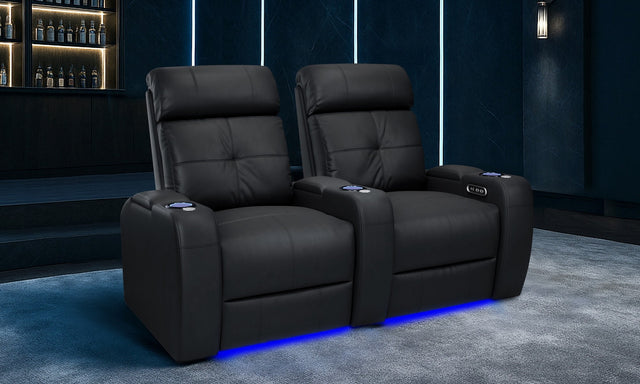
A two-seat configuration — either a loveseat or two paired power recliners — is the right starting point. A shared console between the two seats provides a built-in tray table surface, which removes the need for side tables.
Families of three to five
A single row of three or five seats, with consoles at each end and optionally in the middle, handles most family viewing without a riser. Even-number rows (four seats) work, but three and five avoid the centre seat that everyone avoids.
Frequent entertaining
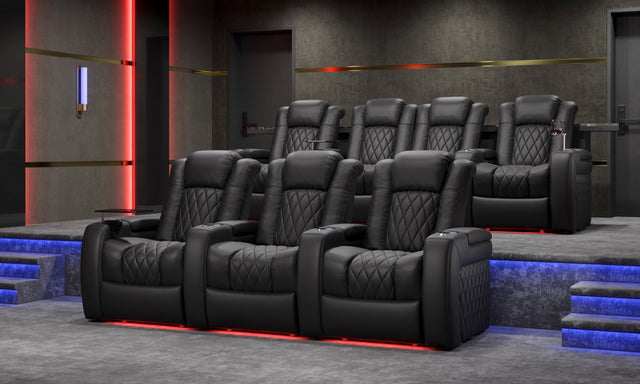
Two rows — a front row at floor level and a raised back row on a 12-to-16-inch riser — give every viewer an unobstructed sightline. The back row typically needs seats with slightly lower backs or a riser calculated to clear the front row headrests.
Row format versus individual seats
Pre-configured row sections (three-seat or five-seat rows with shared armrests) provide alignment and a cleaner finished look. Individual seats allow more flexibility in spacing but require separate alignment during installation. Consoles with built-in tray tables are practical for drinks and remotes; if you prefer open armrests between every seat, skip the console and use side tables instead.
3. Screen Distance and Sightline Planning

Screen size and seat row distance are linked by a straightforward ratio. Get this wrong and you are either craning your neck or sitting too far back to see fine detail.
The distance rule
For every 10 inches of screen diagonal, allow at least one foot of seating distance from the screen face. A 100-inch screen calls for a minimum of 10 feet from the front row. A 120-inch screen moves that minimum to 12 feet. These figures assume a 4K projector or display; lower resolution sources benefit from slightly more distance.
Vertical screen placement
Mount the screen so that the viewer's eye level — when seated and reclined — falls at approximately one-third up from the bottom edge of the image. In practice, this means the centre of the screen sits slightly above seated eye level, not at eye level. For reclined seats, eye level drops compared to an upright chair, so account for the reclined head position when calculating screen mount height.
How screen distance affects row decisions
If your room depth comfortably places the front row at 12–14 feet from the screen, a single row may be all you need. Rooms that push the front row out to 16 feet or more often benefit from a second raised row, which brings those back seats to a closer effective distance without crowding the front row.
4. Features That Matter in Home Theater Seats

Not every feature is worth the price premium. These are the ones that make a measurable difference over a two-hour session.
Power recline versus manual recline
Manual recliners lock into two or three fixed positions via a side lever. Power recliners use an electric motor to move continuously between any angle — you stop where your body tells you to, not where the mechanism allows. For sessions over 90 minutes, the difference is noticeable.
Power headrest
When a seat reclines past roughly 140 degrees, the neck begins to strain against gravity if the headrest is fixed. A power headrest tilts forward independently, keeping the head supported at any recline angle. This feature matters most for two-hour-plus viewing sessions.
Power lumbar
A power lumbar pad inflates or extends to fill the gap between the lumbar spine and the seat back. Different body shapes require different lumbar depths; a fixed lumbar pad is a compromise at best. Power lumbar is particularly useful when the same seat is shared between viewers of different heights.
Heat and massage
Lumbar heat zones raise surface temperature at the lower back, which promotes muscle relaxation during long sessions. Vibration massage runs in discrete patterns across the seat and back. These features are practical additions for daily-use home theaters, not luxury extras for infrequent viewers.
Wall hugger mechanism
Required if the rear of the seat will be within 18 inches of a wall when installed. The mechanism slides the seat base forward as the back reclines, so the headrest never contacts the wall. Standard recliners require 18–24 inches of clearance; wall huggers need four to six inches.
USB charging and ambient LED
USB-A and USB-C charging ports built into the seat base or console eliminate the need for extension cords run to each seat. Ambient LED lighting under the seat base or footrest provides low-level illumination for safe movement during dark screening sessions without washing out the image.
5. Choosing the Right Material
Material choice affects daily feel, maintenance requirements, and how the seat ages over five to ten years. There are three practical categories to evaluate.
Italian Nappa leather grades
Nappa leather is graded by the softness and quality of the hide, with higher numbers indicating finer grain and greater suppleness. The grades used in theater seating range from 9K through 20K.
• 9K Nappa: durable and practical for high-traffic family rooms. Holds up well to daily use.
• 11K Nappa: the best everyday balance of durability and softness. The most common grade in mid-tier theater seating.
• 15K Nappa: noticeably softer; appropriate for rooms used primarily for viewing rather than general family activity.
• 20K Nappa: premium grade, very soft and breathable. Suited to low-traffic dedicated theater rooms.
All genuine Nappa leather benefits from annual conditioning with a leather conditioner to prevent drying and cracking. This takes about 15 minutes per seat per year.
Performance fabric
Performance fabric is breathable, which makes it more comfortable than leather in warmer rooms or during summer months. It resists stains well when treated with a fabric protector, and it is a practical choice for households with children or pets. Regular vacuuming with a soft brush attachment and periodic re-application of fabric protector keep it in good condition.
Bonded leather — avoid
Bonded leather is a composite material made from leather scraps bonded to a synthetic backing. It looks similar to genuine leather at purchase but begins to peel and flake within three to five years under regular use. It is not repairable once it starts to degrade. Avoid it regardless of price point.
6. Budget Tiers: What Each Price Range Delivers

Home theater seating in Canada spans a wide price range. Here is what each tier realistically includes and where the compromises are.
| Tier | Price per Seat (CAD) | Recline Type | Headrest / Lumbar | Material | Heat & Massage |
|---|---|---|---|---|---|
| Entry | Under $1,200 | Power recline | Fixed | Performance fabric or entry leather | Not included |
| Mid | $1,200–$2,000 | Full power recline | Power headrest, power lumbar | Premium leather (11K Nappa or top-grain) | Not included at entry of range; optional at top |
| Premium | $2,000+ | Full power with independent motors | Power headrest, power lumbar | 15K–20K Italian Nappa | Included |
Entry tier (under $1,200 per seat)
At this price point you get power recline and a solidly constructed seat in performance fabric or an entry-grade leather. Headrest and lumbar are fixed, which is acceptable for occasional use or shorter sessions. The Verona is a representative entry-tier option starting from $1,199.99 CAD.
Mid tier ($1,200–$2,000 per seat)
This range delivers full power features — power headrest, power lumbar, and wall hugger mechanism — in premium leather. This is the tier most buyers who intend to use the room daily should target. The Valencia Tuscany starts from $1,749.99 CAD and sits squarely in this range.
Premium tier ($2,000+ per seat)
At this tier, heat and massage are standard rather than optional, leather grades step up to 15K or 20K Nappa, and motor configurations typically support independent backrest and footrest control. The Tuscany Executive starts from $2,499.99 CAD and includes lumbar heat and vibration massage across all configurations.
Frequently Asked Questions
How much space does a home theater recliner need behind it?
A standard power recliner requires 18 to 24 inches of clearance between the back of the seat and the wall to fully recline without contact. A wall hugger recliner uses a forward-sliding seat base mechanism that reduces that requirement to four to six inches, making it the practical choice for any seat placed close to a wall or in a tighter room.
What is the minimum room width for a three-seat home theater row?
Most three-seat rows measure between 100 and 120 inches (roughly 8.5 to 10 feet) in total width. Add six inches of clearance on each side and you need a room at least 10 to 11 feet wide for a three-seat configuration. At that width there is minimal room for side tables or traffic paths. A 12-foot-wide room gives a more comfortable fit.
Is power recline worth the extra cost over manual?
For a dedicated home theater used regularly, yes. Manual recliners lock into two or three fixed positions determined by the mechanism, not by your posture. Power recliners stop at any angle, so you can adjust mid-film without disturbing the seat. The difference becomes significant over sessions longer than 90 minutes. Manual recliners are a reasonable choice for casual living room use but are a compromise in a purpose-built theater.
What is a power headrest and do I need one?
A power headrest is a motorized headrest section that tilts forward independently of the seat back. When a seat reclines past roughly 140 degrees, a fixed headrest leaves the head unsupported and the neck under strain. The power headrest tilts to follow the head at any recline angle. If you plan to recline fully or use the seat for sessions over two hours, a power headrest is a practical necessity rather than a luxury.
Which Nappa leather grade is best for daily family use?
11K Nappa is the most practical grade for daily family use. It balances durability with a comfortable feel and holds up well under regular handling. The 15K and 20K grades are softer and have a finer surface texture, but they are better suited to lower-traffic dedicated rooms. For households with children or pets, performance fabric is also worth considering as it is more stain-resistant and breathable.
How do I calculate screen-to-seat distance for a 110-inch projector screen?
Apply the standard ratio: one foot of seating distance per 10 inches of screen diagonal. A 110-inch screen calls for a minimum of 11 feet from the screen face to the front-row seat. This is a minimum; for 4K content at that screen size, 12 to 13 feet provides a more comfortable field of view. Measure from the screen surface itself, not the wall behind it, especially for projectors using short-throw lenses.
Do home theater seats need to be bolted to the floor?
Freestanding home theater seats do not need to be bolted down for normal use. Row sections connected by shared armrests are heavy enough to remain stable without floor attachment. If seats are placed on a raised riser, many installers prefer to secure the back legs to prevent any rocking on the elevated platform. Check with your installer; most riser configurations benefit from at minimum friction pads or angle brackets at the rear.
What is the difference between heat and massage features in theater seats?
Heat and massage are separate systems that typically come packaged together in premium seats. The heat function uses a low-wattage heating element in the lumbar zone of the seat back, raising the surface temperature to a comfortable level that promotes muscle relaxation. The massage function uses vibration motors positioned at intervals across the back and seat cushion, running in preset patterns. Both can usually be operated independently and at varying intensity levels via the seat control panel or remote.


