

In this article: A practical comparison of home theaters and media rooms — covering how each space is defined, what each requires in room size and construction, display and audio differences, seating choices, and how to decide which is right for your home.
- How Each Space Is Defined
- Room Size and Construction Requirements
- Display and Audio Expectations
- Seating: What Works in Each Space
- Acoustic and Lighting Differences
- Which Setup Is Right for You
- Frequently Asked Questions
The difference between a home theater and a media room is not budget — it is commitment level. A home theater is a single-purpose, purpose-built space optimized entirely around the viewing experience. A media room is a multi-use space that prioritizes flexibility. Both can accommodate premium seating, large screens, and excellent audio. The decisions that follow from that initial distinction, however, are entirely different.

Understanding which category your project falls into before you spend anything — on seating, construction, or AV equipment — prevents the most common and expensive mistake in home entertainment builds: designing a media room but building toward theater-level expectations, or vice versa.
Quick Takeaways
• Home theater: single purpose, full commitment.
A dedicated room with light control, surround sound, acoustic treatment, fixed seating rows, and a projector-and-screen setup. Once built, it does one thing well.
• Media room: multi-use, flexible.
A room that also functions as a family room, games room, or casual lounge. Normal room lighting is acceptable. Sectional sofas and recliners both work. A large TV is the practical display choice.
• The build cost difference is significant.
A media room requires no special construction. A home theater requires blackout construction, dedicated electrical, in-wall wiring, and often acoustic treatment — adding $5,000–25,000+ in construction costs above the AV and seating budget.
• Both can use premium theater seating.
Power recliners work in both spaces. The configuration differs: fixed rows with consoles suit a dedicated theater; individual recliners or sectional-adjacent configurations suit a media room.
• You can upgrade a media room to a theater later.
The reverse — converting a dedicated theater back to a media room — is rarely practical. Start with media room if you are uncertain. Build out to theater when you are ready.
1. How Each Space Is Defined

The definitions are functional, not aesthetic. A room is a home theater if it is designed around the single use case of watching film and television at the highest possible quality. A room is a media room if it accommodates that use alongside others.
Home Theater Defining Characteristics
• Single-purpose room — no secondary uses during or between viewing sessions.
• Complete light control — blackout on all windows, sealed door threshold, no ambient light sources during viewing.
• Dedicated surround sound — minimum 5.1, typically 7.1 or Dolby Atmos configuration with in-wall or ceiling speaker placement.
• Fixed seating rows — theater recliners in rows, typically with consoles, positioned at calibrated viewing distances from the screen.
• Projector and fixed-frame screen — the standard display for a true dedicated theater. Screen sizes 100" and above.
• Acoustic treatment — first-reflection panels, bass traps, and rear-wall absorption to control room acoustics.
Media Room Defining Characteristics
• Multi-use room — also used for gaming, casual TV watching, family time, or as a secondary living room.
• Standard room lighting — overhead lights, floor lamps, natural light from windows are acceptable during use.
• Flexible audio — soundbar with a subwoofer, or a basic 5.1 system with conventional speaker placement. No in-wall requirement.
• Flexible seating — sectional sofas, individual recliners, modular configurations that can rearrange as use patterns change.
• Large-format TV — 75"–98" 4K panel. No projection required. Easier installation, better in ambient light.
• No acoustic treatment required — the room serves multiple uses and acoustic treatment for cinema quality is not a priority.
2. Room Size and Construction Requirements

Room requirements are where the two approaches diverge most sharply. A media room can occupy almost any existing room in a home. A home theater imposes specific dimensional minimums and construction requirements that cannot be worked around.
| Requirement | Home Theater | Media Room |
|---|---|---|
| Minimum room size | 12 × 18 ft (single row); 12 × 24 ft (two rows with riser) | Any room 10 × 12 ft or larger is workable |
| Ceiling height | 8 ft minimum; 9 ft recommended for two-row with riser | Standard 8 ft ceilings are fine |
| Room shape | Rectangular required; L-shapes and open plans are problematic | Any shape works |
| Windows | Blackout construction required; ideally no windows at all | Standard window treatments acceptable |
| Electrical | Dedicated circuit to seating wall; separate circuit for projector/AV | Standard outlets; no dedicated circuit required |
| In-wall wiring | Speaker wire, HDMI conduit, low-voltage lighting runs required before walls close | Surface-mount or wireless solutions acceptable |
| Acoustic treatment | First-reflection panels and bass traps required for proper performance | Not required |
| Construction cost delta | $5,000–25,000+ above baseline room cost depending on finishes and acoustic investment | No special construction cost; uses existing room |
Canadian basement considerations: basement rooms are the most common location for dedicated home theaters in Canada because below-grade construction naturally provides light control and acoustic isolation from the main living area. The added construction investment for a theater in a basement is often lower than above-grade because the concrete walls and floor already provide isolation and blackout conditions. The primary additional cost in a Canadian basement theater is humidity management — a dedicated dehumidifier is essential to protect leather seating and AV equipment.
3. Display and Audio Expectations

Display and audio choices follow directly from the room type. The performance ceiling for each category differs substantially.
Display
• Home theater: projector with a fixed-frame screen is the standard. A 4K laser projector and a 120" fixed-frame screen deliver an image scale impossible with any flat panel. The requirement is complete light control — projectors produce very poor images in ambient light. Short-throw projectors can work in rooms where ceiling mounting is constrained by beams or duct drops.
• Media room: a large-format 4K OLED or QLED TV in the 75"–98" range is the practical choice. These panels deliver excellent black levels and color accuracy even in rooms with ambient light. No special installation beyond wall mounting or a TV stand is required.
• The crossover point: at 100" and above, projection is typically more cost-effective than a flat panel of equivalent size. Below 98", a premium TV is usually the more practical choice for a media room.
Audio
• Home theater: minimum 5.1 surround (left, center, right, two surrounds, subwoofer) with in-wall or bookshelf speaker placement calibrated to the room. Dolby Atmos 7.1.4 with ceiling speakers is the current reference configuration. All speaker cables run in-wall before construction closes. An AV receiver capable of room calibration (Audyssey, Dirac Live) is recommended.
• Media room: a quality soundbar with a separate subwoofer delivers substantially better audio than a TV's built-in speakers with no installation complexity. A dedicated 5.1 system with floor-standing or bookshelf speakers on stands is the upgrade path if surround sound is desired without in-wall installation.
4. Seating: What Works in Each Space

Premium theater seating works in both spaces. The configuration — how seats are arranged and grouped — differs by room type.
Home Theater Seating Configuration
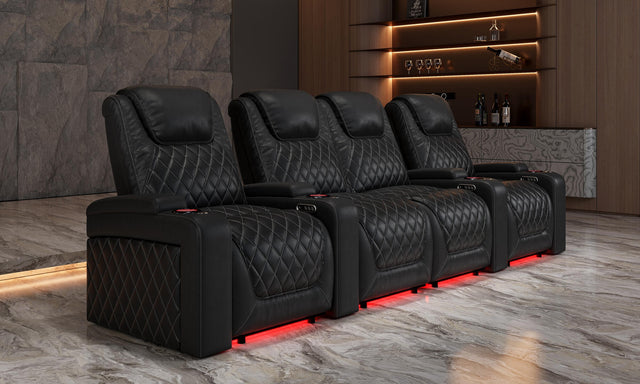
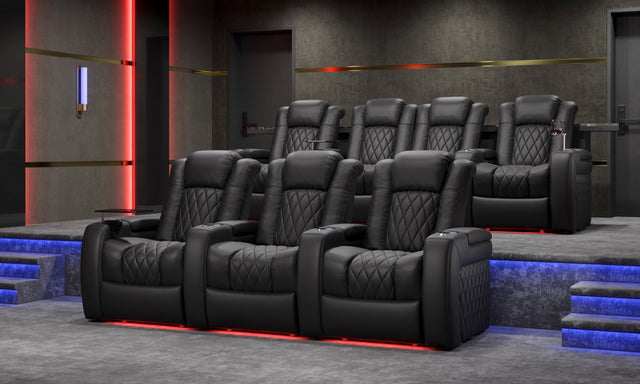
• Fixed rows with consoles: theater recliners in 3- or 4-seat rows linked by center consoles (with cup holders, storage, LED lighting). Rows positioned at calibrated viewing distances from the screen. All seats face the screen. This is the configuration used in commercial cinemas and is appropriate for dedicated home theater rooms.
• Row count: single row for rooms up to 20 ft deep; two rows with a riser for rooms 22 ft and deeper.
• Seat selection priority: power recline for comfort during 2-3 hour viewing sessions, power headrest adjustment for proper neck angle, USB charging at each seat position, consistent seat height across the row for uniform sightlines.
Media Room Seating Configuration
• Flexible arrangements: individual power recliners positioned around a large TV, sectional sofa with a recliner end, or a combination of a central sofa and flanking recliners. No fixed-row requirement.
• Modular seating: media rooms benefit from configurations that can be rearranged for parties, gaming sessions, or casual use. Individual recliners can be repositioned; sectionals can be reconfigured.
• Seat selection priority: comfort for varied use patterns (not just long movie sessions), easy access and egress, compatibility with the room's other functions.
5. Acoustic and Lighting Differences

Acoustic and lighting requirements are the areas where the two room types diverge most practically in day-to-day use and construction planning.
Home Theater Lighting
• Movie mode: total blackout. Every lumen of ambient light during viewing reduces perceived screen contrast. Blackout curtains or solid shutters on any windows, sealed door threshold, no power indicator lights visible from seating.
• Navigation mode: low-level step lighting under riser edges and seat bases, activated by a separate switch or scene controller. Allows safe movement during viewing without ruining the image.
• Bias lighting: LED strip behind the screen facing the wall — reduces perceived eye strain and creates a reference luminance environment that makes the screen appear more contrasty.
• Social mode: dimmable indirect lighting (sconces or recessed, 2700K color temperature) for pre-film gatherings and intermissions.
Media Room Lighting
Normal residential lighting is fully acceptable in a media room. Overhead recessed lights, floor lamps, and natural light from windows are all manageable with a large-format TV — modern OLED and QLED panels produce enough peak brightness to remain watchable in daylight. Dimmer switches on overhead lighting are a worthwhile upgrade that allows the room to function at reduced light levels during evening viewing without being a strict requirement.
Acoustic Treatment
• Home theater: acoustic treatment is functional, not decorative. First-reflection panels on sidewalls address the mirror-point positions where early sound reflections arrive at the listening position slightly after the direct sound, causing comb filtering. Bass traps in floor-to-ceiling corners address low-frequency buildup. Rear-wall absorption prevents standing waves from building up between the front speakers and the back wall. Without these, even excellent speakers produce a room-colored, echo-y result.
• Media room: no acoustic treatment is required. The room's furniture, carpet, and soft furnishings provide incidental absorption. For a media room with a sound bar, the difference acoustic treatment would make is not worth the investment or aesthetic compromise.
6. Which Setup Is Right for You

Use the following criteria to place your project in the right category before making any commitments.
Choose a Home Theater If:
• You have a dedicated room that will serve no other purpose.
• You are willing to invest in construction beyond the AV and seating budget.
• Your primary use case is watching films at the highest possible quality, not casual TV or gaming.
• You have a basement or interior room that can achieve complete light control.
• You plan for two or more rows of seating.
Choose a Media Room If:
• The room serves other functions — family room, games room, secondary living space.
• You are not prepared to commit to blackout construction or dedicated electrical work.
• The room has windows you want to keep functional.
• Flexibility in seating arrangement is more valuable than a calibrated viewing position.
• You want the option to upgrade toward a theater later without fully committing now.
The Upgrade Path
A media room can be upgraded toward theater performance incrementally: add blackout curtains, upgrade audio to 5.1 surround, add a projector and screen, reposition seating into rows. Each step adds theater-like performance without requiring a complete rebuild. This is the correct approach if you are uncertain about full commitment. The reverse — converting a dedicated theater back to general use — is rarely worthwhile given the investment in specialized construction.
Frequently Asked Questions
What is the real difference between a home theater and a media room?
The distinction is purpose, not price. A home theater is a single-purpose room built around the highest-quality viewing experience — complete light control, calibrated surround sound, acoustic treatment, and fixed theater seating. A media room is a multi-use space where watching TV or film is one of several activities. Both can involve premium seating and large screens; the difference is in the room construction, lighting design, and audio configuration that each requires.
How much does a home theater cost to build compared to a media room?
A media room uses an existing room without special construction — the cost is seating, the display, and audio only. A dedicated home theater adds significant construction costs: blackout window treatments or solid walls, in-wall speaker and HDMI cabling, a dedicated electrical circuit to the seating wall, acoustic panels, specialized lighting control, and a projector ceiling mount. Construction additions typically range from $5,000 to $25,000+ depending on room size, finish level, and acoustic investment. The AV and seating budgets are similar for both; the construction delta is where the cost diverges.
Can I convert a media room into a home theater later?
Yes, and this is often the recommended approach when you are uncertain about full commitment. A media room can be upgraded incrementally: add blackout curtains, upgrade to a 5.1 surround system, add a projector and screen, add acoustic panels, and reposition seating into fixed rows. Each upgrade improves the viewing experience. The most expensive and disruptive step — in-wall speaker cabling — is easier to plan for during the original room build even if you install it later. Reverse conversion (theater back to media room) is rarely practical given the specialized construction investment.
What seating works best in a media room vs. a home theater?
Home theaters use fixed theater recliner rows, typically in 2-, 3-, or 4-seat configurations with consoles, positioned at calibrated distances from the screen. The row format maximizes the number of optimal viewing positions. Media rooms benefit from more flexible arrangements — individual power recliners, sectional sofas with recliner ends, or mixed configurations that can be rearranged for different uses. Power recliners are a good investment for both spaces; only the arrangement strategy differs.
Do I need a projector for a home theater, or will a large TV work?
A projector with a fixed-frame screen is the standard for a dedicated home theater for screen sizes 100" and above. At that scale, projection is significantly more cost-effective than a flat panel and delivers the cinema-scale image experience the room is designed for. For rooms where complete light control is not achievable (typically media rooms), a premium 85"–98" TV is a better practical choice — modern OLED and QLED panels handle ambient light far better than projection. The break-even point is roughly 100": below that, a TV is more practical; above that, projection wins on value and scale.
Does room shape matter for a home theater?
Significantly. A rectangular room is required for a proper home theater. Rectangular rooms produce predictable acoustic behavior, allow systematic treatment of first-reflection points, and simplify row layout planning. L-shaped rooms, rooms with structural columns, open-plan spaces, and rooms with irregular ceiling heights all create acoustic and layout problems that are difficult or impossible to fully resolve. If you have a choice of rooms, always choose the most regular rectangular option for a dedicated theater.
Do I need acoustic treatment in a media room?
Not typically. The soft furnishings, carpet, and varied surfaces in a typical media room provide sufficient incidental absorption to avoid severe acoustic problems. If you notice strong echo or flutter (a metallic slap when you clap in the empty room), a few fabric wall panels or a thick area rug will address it. Full acoustic treatment with calibrated first-reflection panels and bass traps is warranted only when you commit to theater-level audio performance with calibrated speaker placement.
What are the most important considerations for a Canadian basement media room or theater?
Canadian basements are the most common location for dedicated home theaters because they naturally provide light control and acoustic isolation. The primary additional considerations for a Canadian basement are: (1) humidity management — maintain 45–55% relative humidity year-round with a dedicated dehumidifier to protect leather seating and AV equipment; (2) ceiling height — post-1990 Canadian homes typically have 8-ft basement clear ceiling height, which is workable for single-row setups; 9-ft ceilings are needed for a two-row build with a riser; (3) insulation — exterior basement walls should be insulated with closed-cell spray foam to prevent thermal bridging and moisture migration.


